

Release Notes May 2026
Platform
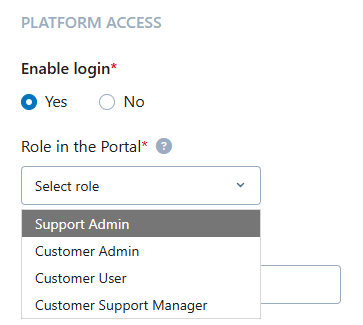
Introduction of New Role: Support Admin
If you want to separate support administration from financial visibility, you can now use the new "Support Admin" role.
Feature at a glance:
-
New Support Admin role
-
is based on the existing Customer Support Manager capabilities. That means, a user with that role can view all cases and act as a watcher.
-
is intended for team members who manage support operations but must not see invoices or use the Store.
-
-
Organization management without financial access
- Support Admins have full read and write access in the MYORG menu to manage organizational data and support-related settings.
- They can onboard users and assign only the following roles:
- Support Manager
- User
- They cannot assign or remove the "Admin", "Super-Admin", or "Support Admin" roles.
-
Access to support modules only
- Visible and accessible modules for Support Admins:
- "Data Change Request"
- "Contact Requests"
- Hidden and not accessible modules for Support Admins:
- "Store" menu
- "Invoices" menu and all financial billing data
- Visible and accessible modules for Support Admins:
Benefit
You can now delegate support administration and user onboarding to designated staff while ensuring they do not have access to sensitive financial or commercial information.
MY ORG
Redesign of MY ORG Menu
We have redesigned the MY ORG menu in the CGM PORTAL to give you a clearer, more structured view of your organization and related activities.
What’s new?
1. Organizational data grouped in sections
- Company details and Sales Representative information are now shown together in a single, structured section.
- For Admin users, this section is collapsible and is collapsed by default (can be expanded as needed by clicking the Show Details button).
- For non-admin users, the organizational data is always expanded and cannot be collapsed, similar to the previous behavior.
2. New section: "Highlighted Actions" and charts
- A new section for Highlighted Actions and Charts has been introduced at the top for:
- Super Admins
- Admins
3. Tabs grouped into logical categories (for customers)
Below the charts, tabs are now organized into context groups.
Note: The exact tabs shown depend on your role, access rights, and the CGM company. If a section has no tabs available, that section is not shown at all. This keeps the MY ORG menu clean and focused on what you actually need and can access.
| General | Transactions | Documents |
|
|
|

Benefit
You get a more organized and intuitive view of your organizational data, actions, and documents. Information is grouped by context, unnecessary sections are hidden, and key actions and insights are highlighted—making it easier to find what you need and work efficiently in MY ORG.
Support
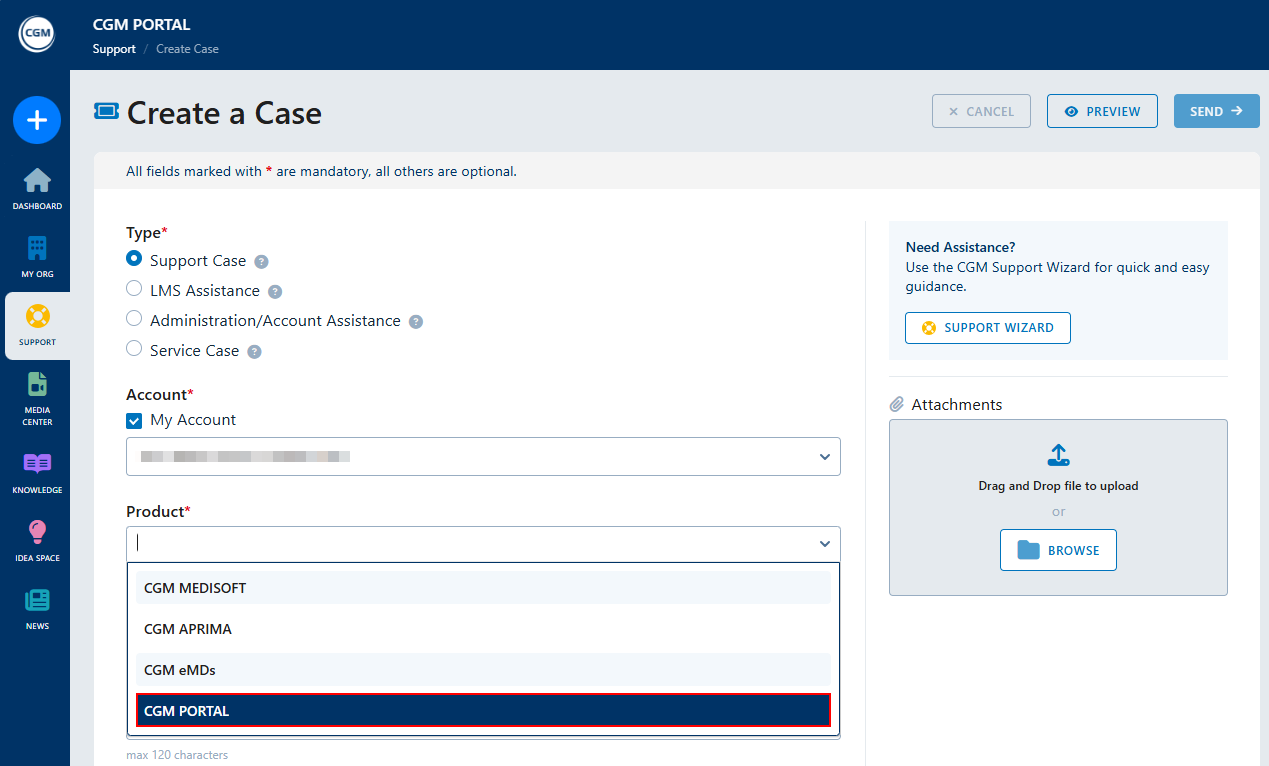
CGM PORTAL as Product Option in Case Creation and Support Wizard
If you have issues with the portal, you can now create Support Cases for the CGM PORTAL directly via the CGM PORTAL itself, provided this option is activated for the CGM organization your company is assigned to.
What’s new?
- In the Case Creation form and in the Support Wizard, the product family "CGM PORTAL" will be available in the Product selection step.
- When selecting "CGM PORTAL" as the Product, you can choose from case categories and complete the Support Case as usual.
Support for Special Characters in External Case Number Field
You can now enter special characters in the "External Case Number" field when creating a case in the CGM PORTAL, either via the Case Creation form or the Support Wizard.
What’s new?
The "External Ticket Number" field now supports special characters such as:
- - (hyphen)
- # (hashtag)
- _ (underscore)
- [ ] (square brackets)
Benefit
You can now enter the exact ticket number as generated by your upstream systems, enabling reliable automated matching between your systems and the CGM PORTAL.
Consolidated Notifications for Case Updates
Case update emails from CGM PORTAL have been streamlined and made more consistent to reduce noise and make follow-up easier.
What’s new?
-
One email instead of many
If several changes happen on the same case within a short time (for example, a status update, or a new comment), you will now receive one consolidated email instead of multiple separate messages. -
Clear and consistent sender addresses
- For open or ongoing cases (for example, status OPEN, IN PROGRESS, CUSTOMER REPLY) or in case you have been added as watcher:
Emails are sent from notification@… and you can reply directly to the email to add a comment to your case. - For completed cases (status COMPLETED):
Emails are sent from noreply@… and cannot be replied to, ensuring no new communication is started on closed cases.
- For open or ongoing cases (for example, status OPEN, IN PROGRESS, CUSTOMER REPLY) or in case you have been added as watcher:
-
Clean subject lines and content
- Technical placeholders no longer appear in email subjects or bodies.
- All email texts now correctly show the case ID, author, and other relevant information.
Benefit
You receive fewer, more meaningful notification emails, always know whether you can reply, and see all relevant updates (status changes and comments) in a single, clearly structured message.
Idea Space
Automatic Translation of Ideas
The Idea Space is currently being used by users across different countries who create ideas in their own language.
This creates a problem for users who do not speak the respective language and cannot understand the idea. To improve your user experience in the Idea Space and to make it easier to use across countries and languages, ideas are now translated automatically based on your login language in the portal.
What’s new?
If you view an idea that was created in a different language than your portal login language:
- the headline and idea description in the Idea Details are translated automatically.
- it is indicated by "Translated from XXX" next to the creation date.

Benefit
You can better understand ideas from other countries, help avoid duplicate ideas in different languages, and participate more effectively in cross-country idea sharing in the CGM PORTAL.